Problem author manual Preview
Use this manual when you create or maintain the content participants solve: the scenario, deployable environment, verifier, scoring metadata, and hints. You do not need to operate a TenkaCloud event or change platform code.
Problem Packs can manage company problems and content awaiting publication without a public catalog contribution. Cloud reads activated AWS/CloudFormation packs on the next deployment. Local reads its problems/ tree rather than the Pack store. Publication remains a separate author decision.
Your goal
A pack is ready to publish when these three outcomes are reproducible:
make pack-validatesucceeds from a fresh checkout.- For a supported local runtime, the author rehearses the complete path from start through flag submission.
- A participant-role check can explain the goal and first action from the participant-facing statement alone.
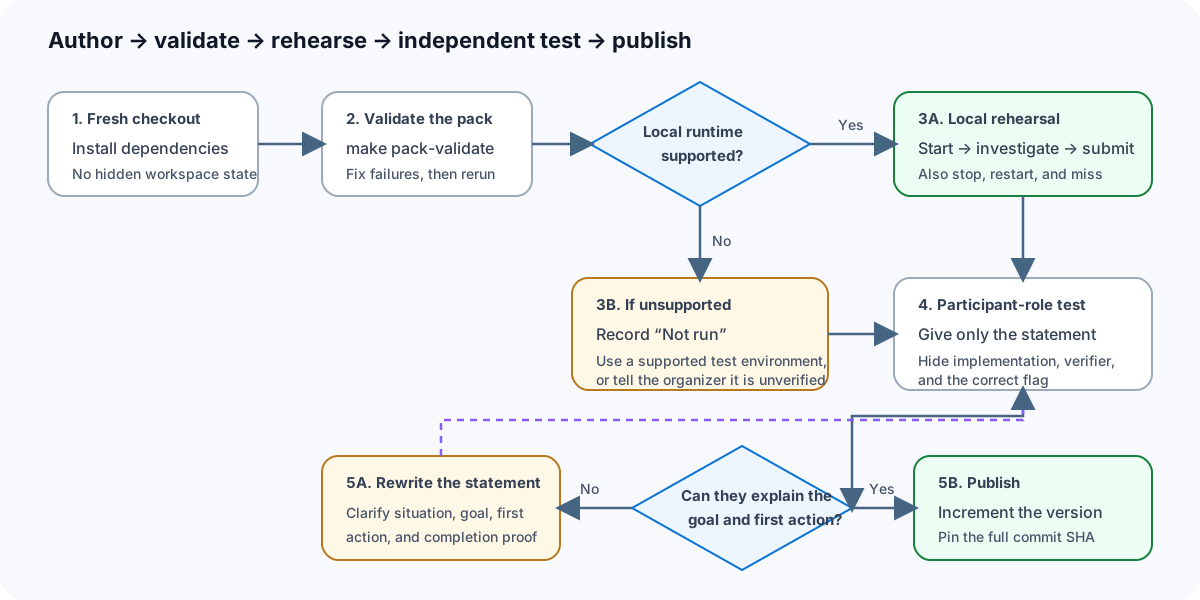
When local execution is unsupported, record Not run instead of inferring a
result. This does not block merge. A real-cloud rehearsal is optional before a
specific event. The participant-role check may be performed by the author or
reviewer, or recorded as a deterministic browser assertion; it does not require
an independent tester. If the statement is unclear, rewrite its situation,
goal, first action, and completion condition before changing the environment.
Create and validate a pack
make pack-init ARGS="./my-first-pack"
make pack-validate ARGS="./my-first-pack"
The first pack tutorial follows one minimal pack from scaffold to validation, immutable Git pin, install, local inspection, and removal.
Author the participant experience
Every problem should answer these questions before introducing technical detail:
- What happened in the scenario?
- What observable result must the participant produce?
- What is the first safe action?
- Where will the participant work: a URL, shell, cloud console, or local app?
- What exact evidence becomes the
TC{...}flag? - How can the participant reset or stop the environment?
Explain a term at first use if a participant needs it to act. Avoid testing whether they memorized words such as cloud, container, Docker, region, or database unless that concept is the learning objective.
The problem contract
| Part | Responsibility |
|---|---|
tenkacloud-pack.json |
Pack identity, version, license, problem root, runtimes, dependencies |
metadata.json |
Problem ID, runtime, template, scoring, endpoints, phases, disruptions |
| Runtime entry | Creates the isolated environment the participant actually uses |
| Verifier or scoring rule | Decides whether the submitted evidence is correct |
| README / statement | Scenario, goal, first action, success condition, cleanup |
| Hints | Progressive help without revealing the final answer too early |
Use the generated pack manifest and problem metadata references instead of guessing field names.
Rehearse the real interaction
Validation checks the contract and referenced files, but it does not prove that the problem is understandable or solvable.
- Start from a clean local or test environment.
- Follow only the participant-facing statement.
- Start the deployed or local problem environment.
- Perform the intended investigation or repair.
- Submit the exact flag through the Participant Portal.
- Test one wrong flag, reset, stop, and a second start.
- Repeat the participant-role path without using implementation, verifier, or answer data.
The author, a reviewer, or a deterministic browser harness may record this evidence. Publish when the participant-visible route explains what happened, what must be fixed, where to start, and what proves completion. Independent third-party and real-cloud runs are optional event rehearsals, not merge gates.
Local mode is for problems that declare a supported local runtime. It is not a WordPress tutorial or a substitute for the participant onboarding. A WordPress problem, if desired, belongs here as its own local problem with its own learning objective and verifier.
Publish safely
- Increment the pack version for a new immutable release.
- Validate before committing.
- Pin installation to the full 40-character Git commit SHA.
- Do not put secrets, mutable remote assets, or install-time scripts in a pack.
- Keep author-only answers out of participant-visible metadata and endpoints.
- Give organizers a separate rehearsal note for required accounts, region, expected start time, teardown, and costs.
The security and provenance model defines what a pack may contain. Validator messages are listed in validation errors.
If the pack requires a new platform capability rather than problem content, open a platform Issue and switch to the developer manual.
The catalog/workbench for all 106 former local problems and 15 declared terminal variants are connected to Challenge competitions. Real Docker/browser rehearsals cover the SQL and PostgreSQL terminal representative paths. This is not a completed walkthrough of every problem or terminal variant; record each unverified participant path as Not run.